Multiforum Demo Part 4: Voting and Feedback
January 11, 2025
I’m excited to share a new feature in Multiforum: the voting and feedback system. Multiforum is a reddit-like platform where you can create and participate in multiple forums. You can submit posts, vote on them, and now, leave meaningful feedback. Here’s how it works.
The Voting System
The voting system in Multiforum is designed to surface the most relevant and engaging content. Posts and comments can be upvoted, and their ranking depends on a few factors:
- Hot: A balance of upvotes and recency determines the ranking.
- New: Posts sorted in chronological order.
- Top: Posts with the highest weighted upvotes, where votes from older accounts with more reputation carry more weight.
Let's say we have an example forum with posts about ChatGPT. In this screenshot, you can see how the post "ChatGPT just yassified me..." comes first because it has two votes (instead of one, like the post below it). In this picture, the upvote button is blue because the logged-in user voted.

This system ensures that quality content is highlighted while giving weight to the contributions of trusted, long-time users.
The Feedback System
This feature addresses some of the common issues with downvotes on platforms like Reddit. Downvotes can feel ambiguous and discouraging. They’re often misused to express disagreement or worse, to attack specific users. To solve this, Multiforum replaces downvotes with a feedback system.
How Feedback Works
On the detail page of a post, you can see that next to the upvote button, there’s a thumbs-down button:
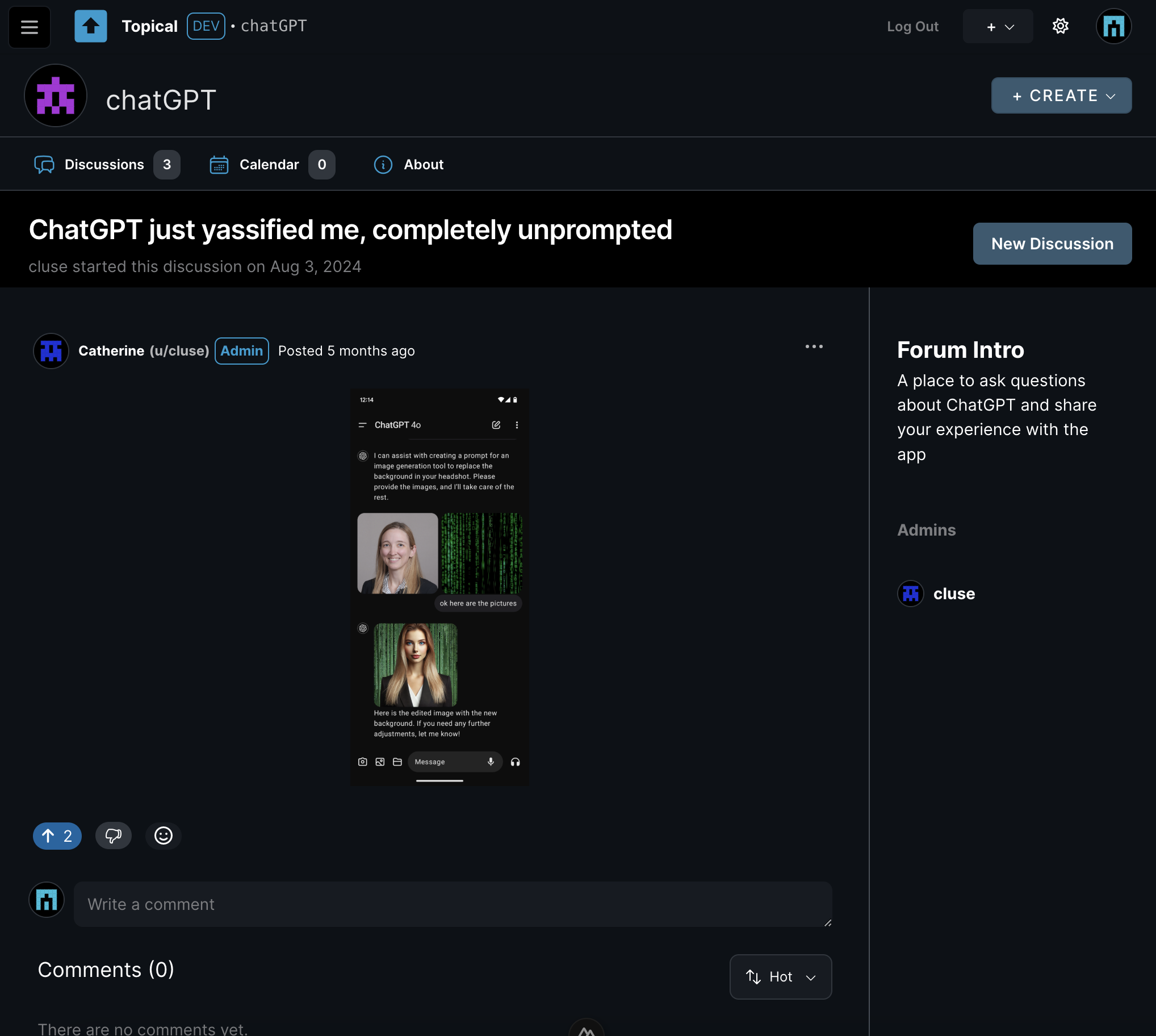
This thumbs-down button is not a downvote. Clicking it opens a modal where you can type constructive feedback into a text box. You can’t leave the box blank.
In the actual app, if you click on an image that is embedded in the body of a post like in this example, it will open in an overlay with the full-size image. But some people find it annoying when they find pictures of text, especially if they are vision impaired or blind. So in this example, let's say you don't like the submission and you want to give feedback to that effect. So you click the thumbs-down button and the feedback modal appears:
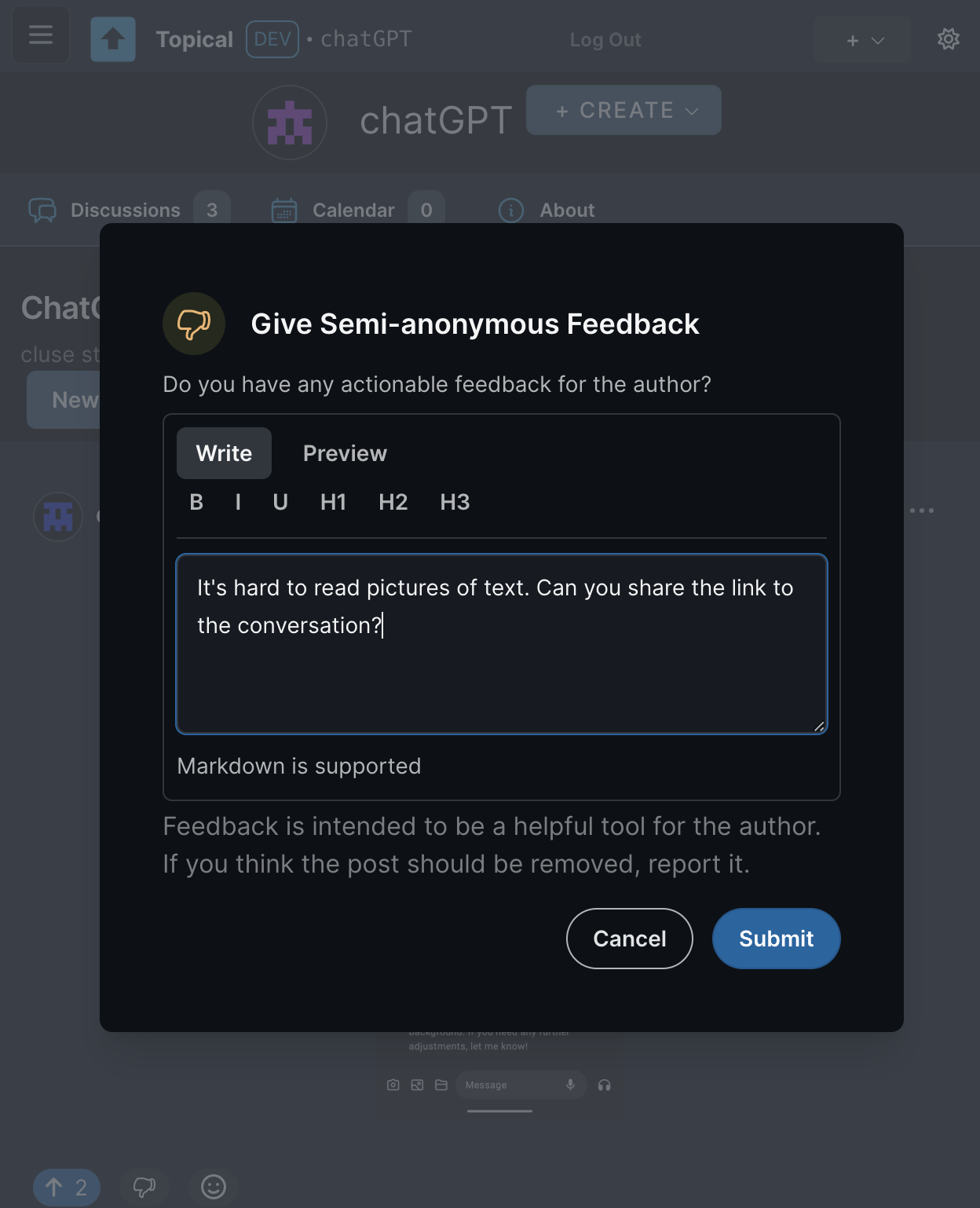
After the feedback is submitted, anyone can see the feedback by clicking the action menu on that post, then clicking View Feedback:
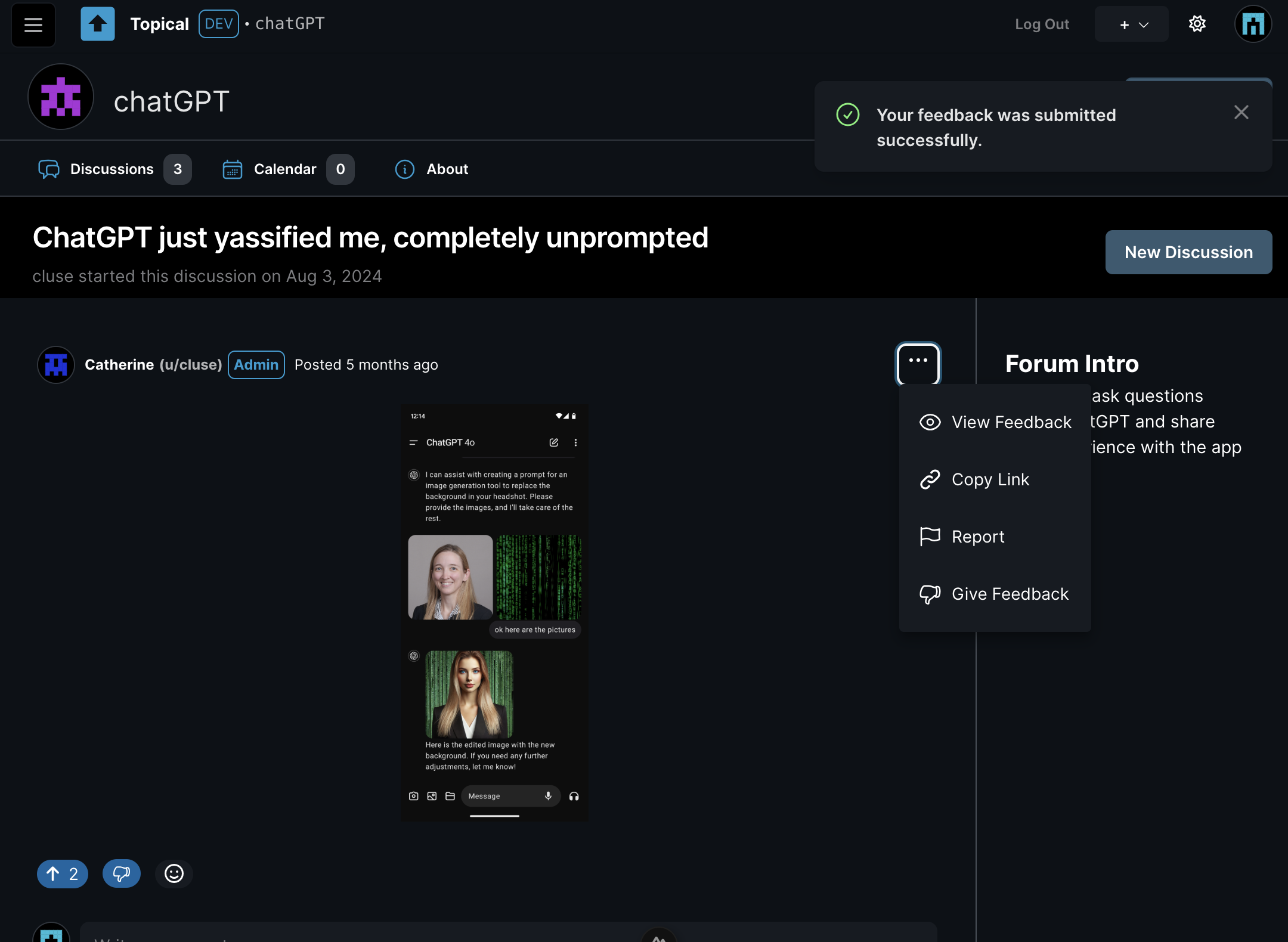
When View Feedback is clicked, you go to the feedback page, where you can see all feedback on the post in the context of the original post:
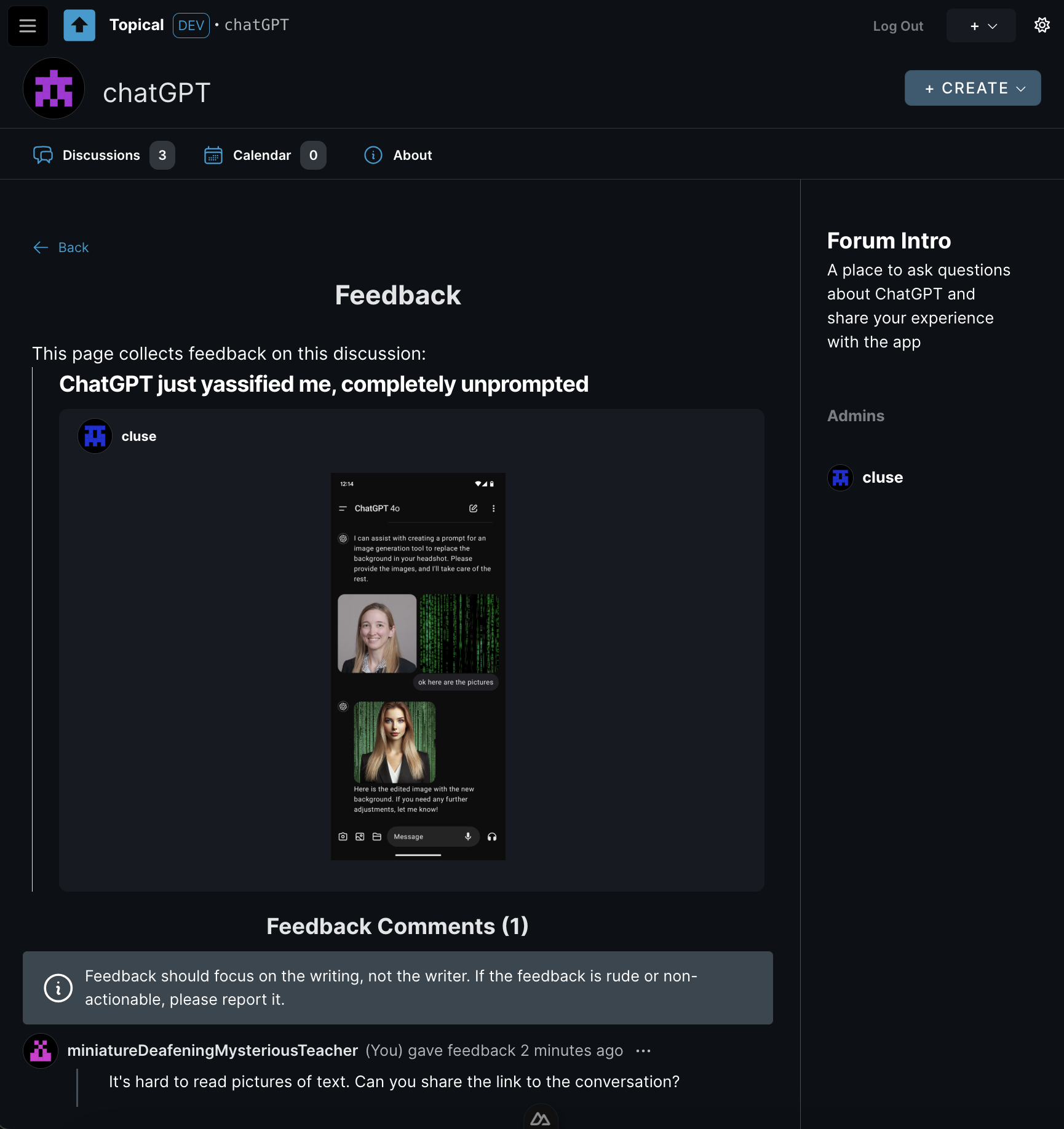
This way, if someone doesn’t like your post or comment, at least you’ll know why. The goal is to turn negative reactions into actionable advice.
This feedback is also public for increased accountability for the person who gave the feedback. Someone who is new to the forum might also benefit from seeing feedback on other people's posts because then they could learn from another person's good-faith mistake.
There are some aspects of this feature that are still unfinished:
- I haven't added any notifications yet, but the idea is that if someone gives feedback on your post, you will get a notification that says you got feedback, and it will link to the feedback page for your post. At that point you will be able to read the feedback or just ignore it.
- If feedback is rude or inflammatory, it will be able to be reported just like any other comment.
- Individual forums will be able to turn off the feature completely.
If the author made the mistake in good faith, the idea is that they'd edit their post based on the feedback, as opposed to just being left to wonder why people don't like their post.
Mod Profiles
To make feedback less personal and reduce the potential for conflict, feedback is attributed to a semi-anonymous mod profile. (It's semi-anonymous because you can recognize the same person posting multiple times; fully anonymous would mean you can't tell if it's the same person or a different person every time.) Every user has two identities:
- Regular Username: Used for normal participation.
- Mod Profile: A randomly generated identifier (e.g., “miniatureDeafeningMysteriousTeacher”) used for moderation actions, including giving feedback.
This serves two purposes:
- It allows the person receiving feedback to save face, as they won’t know who gave the feedback.
- It ensures accountability, as mod profiles have histories showing all feedback given and other moderation actions.
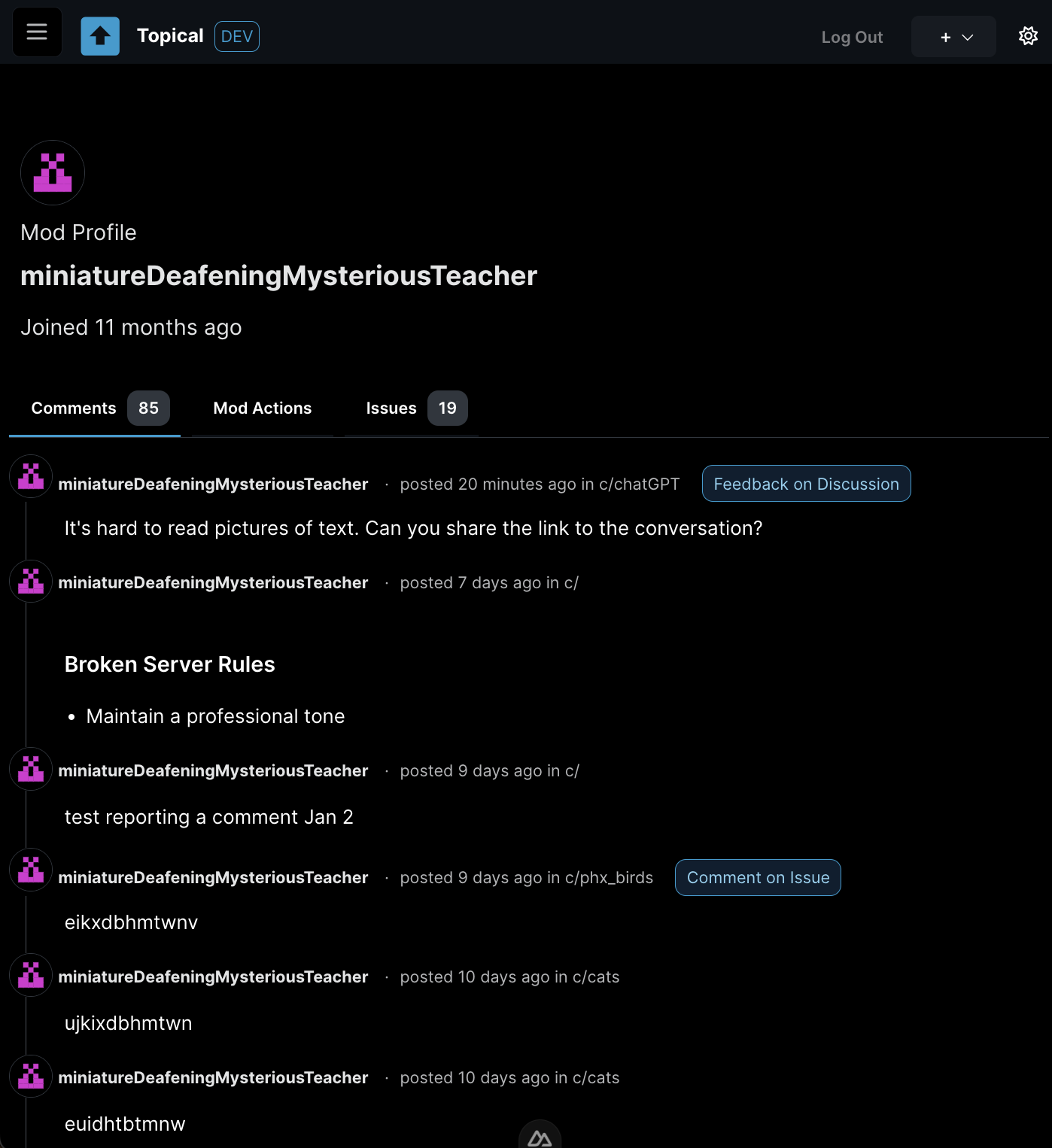
In the above example, a user named alice left feedback. But because feedback is considered a moderation action, the feedback was tracked under her mod profile, miniatureDeafeningMysteriousTeacher. Here you can see all of alice's activity on her mod profile. From here it should be easy to detect any pattern of abuse. The mod profile is still in progress and it's still not perfect, but the idea is that each of these list items will link to the original context of her actions:
Feedback vs. Votes
Feedback is not tied to ranking or visibility. It’s a separate tool meant to help authors improve their contributions.
Why It Matters
This system is intended to encourage constructive communication. By replacing ambiguous downvotes with clear feedback, it's designed to to:
- Provide clarity and helpfulness.
- Reduce the misuse of negative interactions.
- Support authors in improving their posts and comments.